
You built the site. You wrote the pages. You hit publish. And then — nothing.
Not showing up on Google is one of the most quietly demoralizing experiences a small business owner or content creator can have. You did the work. The site is live. People should be finding you. But when you type your own business name or keywords into Google, your site either appears on page four or doesn’t appear at all.
This isn’t random. There are specific, fixable reasons why a site isn’t showing up on Google — and most of them have nothing to do with your content quality. This guide walks through the most common causes, explains what Google is actually doing behind the scenes, and points you to the free tool that gives you a clear diagnosis in minutes.
The Uncomfortable Truth About Google Visibility
Here’s something most SEO guides don’t tell you upfront: Google doesn’t owe your site a ranking. It’s not a directory you register with. It’s a system that constantly evaluates hundreds of signals — and it will simply ignore pages that don’t meet its thresholds for quality, trust, and relevance.
Think of it like a literary agent. You can write a book, but unless it reaches the agent’s desk in the right format, with the right pitch, through the right channels — it goes in the rejection pile. Google’s crawlers are the agents. Your site is the manuscript. And there are a surprising number of ways to accidentally end up in the pile.
The good news? Most of the reasons sites remain invisible are fixable. Some take twenty minutes. Others take a few weeks. But none of them require an expensive agency.
Reason #1: Google Simply Hasn’t Found Your Site Yet
New websites are not automatically indexed. Google discovers pages by crawling the web — following links from already-known pages — and it can take weeks or months to find a brand new site with no external links pointing to it.
This surprises a lot of people. There’s an assumption that launching a site means Google instantly knows it exists. It doesn’t. Google’s crawl queue is enormous, prioritization is based on authority and popularity signals, and a fresh domain with no backlinks sits at the very bottom of that queue.
The fastest fix: submit your sitemap directly to Google Search Console (GSC). Navigate to Index → Sitemaps, paste your XML sitemap URL (usually yoursite.com/sitemap.xml), and hit submit. This tells Google exactly where your pages are and asks it to crawl them. It doesn’t guarantee immediate indexing, but it removes the discovery delay.
Also worth doing: request indexing for your homepage directly. In GSC, use the URL Inspection tool, paste your homepage URL, and click “Request Indexing.” Google typically processes this within a few days.
Reason #2: Your Site Is Accidentally Blocking Google
This one is more common than it should be. A misconfigured robots.txt file or a stray noindex tag can completely prevent Google from indexing your pages — even if everything else is perfect.
The robots.txt file lives at yoursite.com/robots.txt. It tells search engine crawlers which parts of the site to ignore. If someone set it to Disallow: / — possibly during development, to prevent the unfinished site from being indexed — and never changed it after launch, Google is being explicitly told to stay out.
The noindex meta tag does the same thing at the page level. It’s often added by developers to staging pages and forgotten. A single misplaced <meta name="robots" content="noindex"> in a page’s <head> is enough to make that page invisible to Google permanently.
Both issues are invisible to anyone just browsing the site. You won’t notice anything wrong. The page loads fine in a browser. But Google sees the “do not enter” sign and respects it completely.
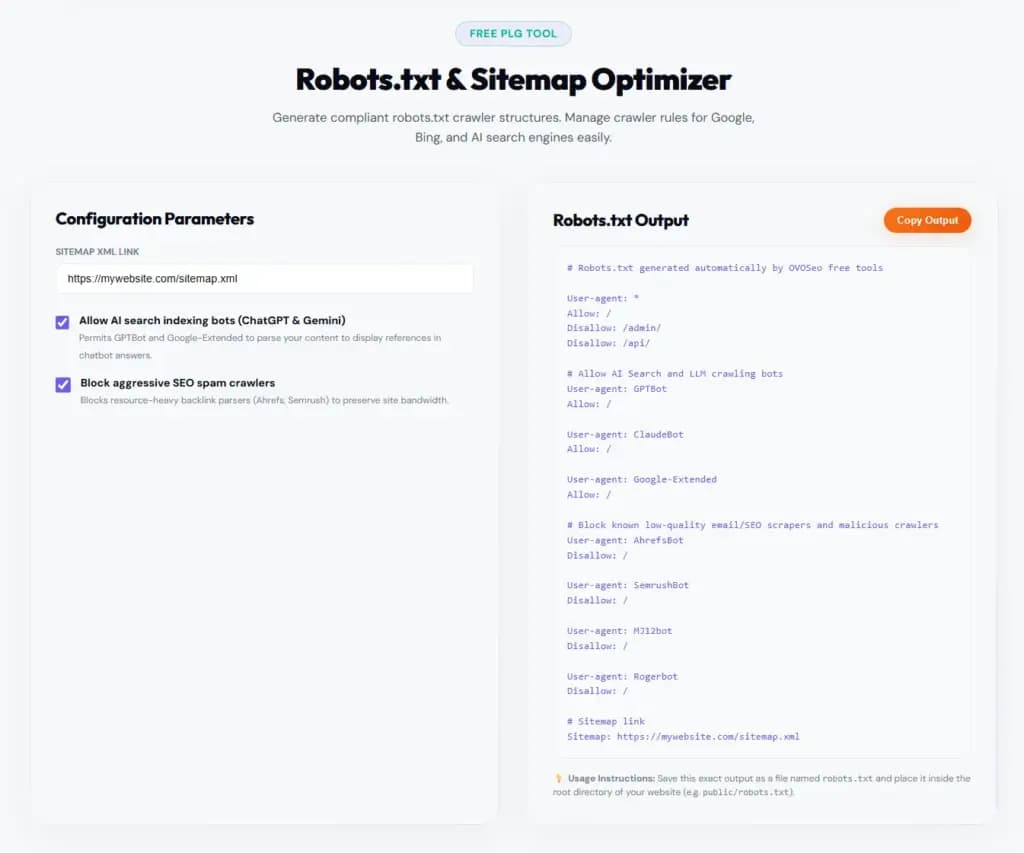
Writing a correct robots.txt file from scratch can be confusing — especially when you need to allow Googlebot, block AI scrapers you don’t want, and protect specific folders all at once. If you’d rather not guess, OVOSeo’s free Robots.txt builds a clean, ready-to-use file based on your site structure in under a minute. It also generates your XML sitemap at the same time, so you can submit both to Google Search Console straight away — no developer needed.
Use the URL Inspection tool in Google Search Console to check any suspicious page. It shows you exactly what Google sees — including whether the page is blocked by robots.txt or marked noindex. Takes about thirty seconds per page.
Reason #3: Your Content Doesn’t Match What People Are Actually Searching
This is the subtler problem. Your site might be indexed — Google knows it exists — but it’s not ranking because your content doesn’t align with the way people search.
A restaurant might have a page titled “Our Menu Philosophy” when people are searching “Italian restaurant downtown [city].” A plumber might write extensively about their qualifications when people are typing “emergency pipe burst repair near me.” The content is real, it’s high quality, but it’s written for the business owner’s voice, not the customer’s search behavior.
This is a search intent mismatch — one of the most common reasons why technically indexed sites don’t appear in relevant searches.
The fix requires keyword research. Not the complex, agency-level kind — just a basic understanding of what your target audience types when they need what you offer. Free tools like Google Search Console’s Performance tab, Google’s autocomplete suggestions, and the “People also ask” boxes in search results give you this information for free, in real time.
Once you know the phrases, rewrite your page titles, H1 headings, and opening paragraphs to reflect them naturally. Not robotically stuffed — naturally, the way you’d explain it to a friend.
Reason #4: Your Site Has Technical Problems Google Can’t Ignore
Page speed, mobile responsiveness, broken links, and missing metadata are all factors that push sites down in rankings — or out of them entirely.
Google’s Core Web Vitals measure real user experience: how fast the page loads (LCP), how quickly it responds to interaction (INP), and whether the layout shifts unexpectedly as it loads (CLS). Sites that fail these thresholds get quietly deprioritized.
A site that takes eight seconds to load on a mobile connection in 2026 is not going to rank ahead of a competitor that loads in two. That’s just reality. And with over 60% of searches happening on mobile devices, a page that isn’t mobile-friendly is effectively invisible to the majority of searchers.
Here’s what to check:
- PageSpeed Insights (free, by Google) — paste your URL and get a score with specific recommendations
- Mobile-Friendly Test — also free from Google, shows exactly how your site renders on mobile
- GSC Coverage Report — flags crawl errors, redirect chains, and pages Google couldn’t access
These three tools take ten minutes to run and will surface the majority of technical issues holding your site back.
The Free Tool That Shows You Exactly Where You Stand
Google Search Console is the most underused free tool in the history of digital marketing. It’s built by Google, it’s completely free, and it shows you — in plain language — what Google thinks about your site.
Connecting GSC to your site takes about five minutes. Once you’re in, here’s what to look at first:
- Performance Report: which queries your site appears for, how many clicks you’re getting, and your average position in search results
- Coverage Report: which pages are indexed, which are excluded, and why — this is where you find noindex issues, crawl errors, and soft 404s
- URL Inspection: check any individual page to see whether it’s indexed, what Google’s cached version looks like, and whether anything is blocking it
- Core Web Vitals: see which pages pass and which pages fail Google’s speed and experience benchmarks
For small business owners who’ve never looked at their GSC data, opening it for the first time often feels like turning on the lights in a room you didn’t know was dark. You can see exactly which search terms triggered your pages, which pages are invisible, and where the quick wins are.
If your site isn’t connected to GSC yet, that’s the single most important action item in this article. Do it today.
What’s Changed in 2026: The AI Search Layer
Here’s the part most guides are still catching up on.
Even if your site ranks on page one, there’s now a layer above traditional results: Google AI Overviews (formerly Search Generative Experience), ChatGPT, Gemini, and Perplexity. These tools are answering questions directly, and the sites they cite as sources get a new kind of visibility — and a new kind of traffic.
Getting cited by AI systems requires different optimization than ranking in traditional search. AI crawlers prioritize:
- Clear, structured content with direct answers near the top of the page
- FAQ sections and structured data (FAQ Schema) that AI can extract cleanly
- E-E-A-T signals — demonstrated expertise, real author credentials, and authoritative sources cited throughout the content
- Consistent, canonical information — no contradictions across pages, no keyword cannibalization
A site that’s well-optimized for traditional SEO but lacks structured data and clear E-E-A-T signals will increasingly be passed over in favor of cleaner, more machine-readable content. This doesn’t mean writing for robots — it means structuring information so both humans and AI systems can understand it at a glance.
Tools like OVOSeo can audit your site against these newer signals automatically — checking for structured data gaps, E-E-A-T markers, and AI-readiness alongside traditional SEO factors.
A Practical Fix List (In Order of Priority)
If you’ve read this far and want a clear starting point:
- Set up Google Search Console and submit your sitemap — if it’s not done, this is step one
- Check robots.txt and meta tags for accidental noindex or disallow rules
- Run URL Inspection on your most important pages to confirm they’re indexed
- Review the Performance Report to see which queries are finding you (or not)
- Fix Core Web Vitals issues flagged in GSC, starting with mobile speed
- Rewrite page titles and H1s to match the actual search phrases your customers use
- Add FAQ schema to your key pages to improve AI search visibility
None of this requires a developer. None of it costs money. It does require time and attention — but it’s the kind of time that compounds, because a well-configured site keeps earning visibility months and years later.
Frequently Asked Questions
Q: How long does it take to start showing up on Google after fixing these issues?
It depends on the fix. Submitting a sitemap or requesting indexing can result in crawling within a few days. Content improvements and technical fixes typically take two to six weeks to reflect in rankings, as Google recrawls and re-evaluates the updated pages. Core Web Vitals improvements can move the needle faster on sites that receive regular crawl attention.
Q: Can I rank on Google without any backlinks?
Yes, especially for low-competition local or niche queries. Backlinks help, but they’re not the only signal. For a local plumber or a specialist service in a smaller market, strong on-page optimization, a well-configured Google Business Profile, and clean technical SEO can produce first-page rankings with minimal backlinks.
Q: My site shows up when I search my business name, but not for any other terms. Why?
This is called branded ranking — Google knows your site exists and indexes it, but it hasn’t assessed it as relevant enough for non-branded queries. The most common cause is a mismatch between your content and the search terms your customers use. Running the Performance Report in GSC for non-branded queries will show you what (if anything) is generating impressions, and that data tells you where to focus your optimization efforts.
Q: Is Google Search Console really free?
Yes, completely free, and it’s provided directly by Google. There’s no paid tier. It covers everything from indexing status to search performance to Core Web Vitals to security issues. For small businesses and independent sites, it’s the most valuable SEO tool available — and the fact that so few site owners actually use it is one of the more baffling gaps in digital literacy.
The Bottom Line
Not showing up on Google is almost never a mystery. It’s a diagnosis problem. Once you know whether you’re dealing with a crawling issue, an indexing block, a search intent mismatch, or a technical performance failure — the path forward is clear.
Google Search Console gives you that diagnosis for free. The fixes are learnable. The results, for businesses that stay consistent, are genuinely transformative. A site that earns organic search traffic doesn’t need to keep paying for ads every month to stay visible. It works while you’re not watching.